How to Choose CTR Manipulation Tools for Home IP Addresses
You are paying for CTR campaigns that run on datacenter IPs while Google flags those visits as automated.
Home IP addresses change that equation, but only if the tool you pick handles location targeting and visit behavior honestly. The wrong choice wastes budget on clicks no search engine counts.
This article breaks down how CTRTool manages home IP campaigns, from location targeting and screenshot proof to desktop versus mobile controls. You will learn which features separate a credible tool from a risky one, how pricing and pay-for-results models compare, and who should actually use a platform like this.
What Is CTRTool and How Does It Handle Home IP Addresses?
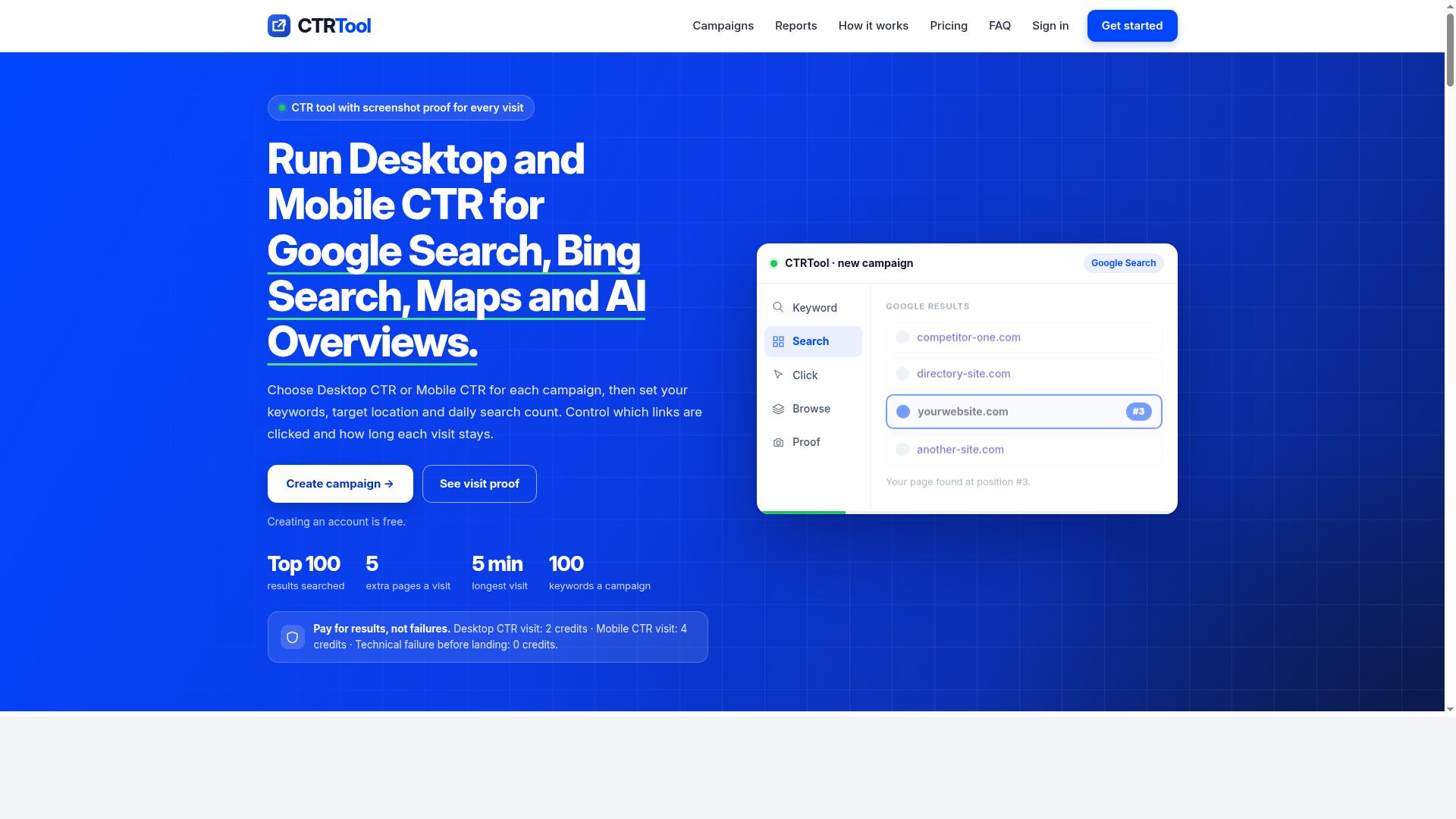
CTRTool is a SaaS platform that runs click-through rate (CTR) campaigns for Google Search, Bing Search, Google Maps, and AI Overviews. It is built for SEO professionals who want to run CTR campaigns for their own or client websites.
Campaigns can be configured as Desktop CTR or Mobile CTR, with keywords, target location, daily search count, and the specific links that get clicked. Users also control how long each visit stays on the page. Every visit is backed by screenshot proof, so the work can be reviewed rather than taken on faith.
CTRTool does not route campaign activity through the user's own home IP address. Instead, visits are delivered through Desktop Chrome windows and real Android phone sessions matched to the target location through managed proxy routes.
That distinction matters because search engines have grown stricter about spotting artificial clicks. CTRTool's approach spreads activity across managed proxy routes rather than a single connection, which reduces the risk of IP blacklisting and fingerprinting tied to one connection.
For anyone weighing CTR manipulation tools, the delivery layer is often the deciding factor. A tool that leans on your home connection puts your own address and browsing identity on the line. A tool that routes through managed proxy routes keeps that exposure off your plate.
It is worth being clear about expectations. CTRTool states plainly that automated visits do not guarantee rankings. The platform is a campaign and measurement tool, not a promise of page-one placement, and that honesty is part of what makes it a credible option in this space.
Does CTRTool Use Home IP Addresses for CTR Campaigns?
CTRTool does not require you to use your own home IP address; instead, it delivers visits through managed proxy routes matched to the target location. Your own connection stays out of the campaign entirely, which is the core reason the platform is built the way it is.
Residential IPs are addresses assigned by internet service providers (ISPs) to real homes. Because they belong to ordinary households rather than server racks, they look like genuine users to search engines. That is a meaningful difference from a datacenter proxy, which is far easier for anti-bot detection systems to flag.
CTRTool delivers visits through managed proxy routes matched to the target location. In all cases, the mechanics are handled on the platform side.
For the user, this means no proxy configuration, no proxy pool to buy, and no need to monitor IP reputation yourself. Just as importantly, your own home IP address is never exposed to the search engines receiving the clicks. That protects you from the risk of IP blacklisting that comes with running click campaigns from a single personal connection.
How CTRTool's Location Targeting Works
CTRTool's location targeting lets you choose a country, and optionally a state and city. You can also select Any country to draw from a mix of supported locations. The platform then matches your selection to the target location through managed proxy routes.
This matters because search results are not the same everywhere. A local SEO campaign or a Maps push depends on the searcher appearing to be nearby, so a click from the wrong region can send the wrong signal. Matching visits to the chosen location keeps click-throughs looking local and keeps the SERP ranking signals consistent with the market you care about.
Geo-targeting applies across Google Search, Bing Search, Maps, and AI Overviews campaigns. Each campaign type has its own conditions: a page must appear within the top 100 organic results for the chosen keyword and location, Maps campaigns check up to 50 listings (about five pages), and AI Overview campaigns need a matching source link.
Location records for country, state, and city are provided by CountryStateCity through the @countrystatecity/countries 2.0.0 package, under the Open Database License 1.0 and Database Contents License 1.0. One balance covers all campaigns, with up to 100 campaigns and 100 keywords per campaign, and daily goals reset at 00:00 UTC. CTRTool does not guarantee higher rankings, leads, or sales, but it does give you control over where each visit appears to come from.
Key Features That Matter When Choosing a Home IP CTR Tool
When evaluating a home IP CTR tool, the features that separate effective platforms from risky ones include screenshot proof, visit path transparency, device control, and location targeting. These features determine whether a tool can deliver realistic clicks that improve SERP ranking without triggering anti-bot systems.
Weak tools hide their activity, mix device types carelessly, and leave no audit trail. Strong tools show exactly what happened on every visit. The subsections below break down each feature and explain why it matters for anyone running campaigns from home IP addresses.
Screenshot Proof and Full Visit Paths
CTRTool provides screenshot proof for every visit, including separate images of the search result and the landing page, along with the full path taken from keyword to click. The search screenshot shows the keyword typed and the result clicked. The landing screenshot shows the target page actually loaded.
Full visit paths go further than a single image. They let you verify that the click came from the intended keyword and the intended location, not a loosely related search. For agencies, this transparency is how results get proven to clients without arguments or guesswork.
Proof also protects your budget. Tools that offer no proof leave you unable to tell a real visit from a failed one, and wasted credits add up quietly. With CTRTool, visits that cannot verify the requested location use no credits, and no credits are charged for technical failures before landing. That is a pay-for-results model rather than a pay-for-attempts one.
Keyword positions are tracked over time as well, including Search positions, Maps listing order, and AI citation order. This turns a campaign into a measurable record instead of a one-off burst of clicks. You can audit quality, spot trends, and show a client how rankings moved across the life of a campaign.
Desktop vs. Mobile Campaign Control
CTRTool lets you choose between Desktop CTR and Mobile CTR for each campaign, giving you control over the device profile used for every visit. That choice is not cosmetic. Desktop and mobile sessions carry different user-agent strings, screen resolutions, and interaction patterns, and search results can differ by device.
Delivery reflects that split. Desktop campaigns run through Desktop Chrome windows, while mobile campaigns use real Android phone sessions matched to the target location through managed proxy routes. Matching the device to the campaign keeps the traffic consistent with how real users in that location would search.
Choosing the right profile depends on the goal:
- Mobile campaigns suit local Maps searches, where phone users dominate and listing order matters most.
- Desktop campaigns suit competitive keywords, where deeper research behavior and longer sessions are common.
- Mixed-device campaigns should be planned deliberately, since an unnatural device split can look odd in analytics.
Combined with country, state, and city targeting, this keeps a campaign's footprint realistic across both device types.
Pricing and Plans
CTRTool offers monthly plans in USD: Starter at $59 per month for 2,000 credits (up to 1,000 Desktop CTR visits or 500 Mobile CTR visits) and Growth at $125 per month for 5,000 credits (up to 2,500 Desktop or 1,250 Mobile visits). Both tiers are straightforward to compare, and the credit math is published up front rather than buried in fine print.
Two larger plans round out the lineup. Scale costs $399 per month for 20,000 credits (up to 10,000 Desktop or 5,000 Mobile visits), while Agency costs $699 per month for 40,000 credits (up to 20,000 Desktop or 10,000 Mobile visits). The Growth plan is marked Recommended, which makes it a sensible default for most campaigns.
| Plan | Monthly Price | Credits | Desktop Visits (Up To) | Mobile Visits (Up To) |
|---|---|---|---|---|
| Starter | $59 | 2,000 | 1,000 | 500 |
| Growth (Recommended) | $125 | 5,000 | 2,500 | 1,250 |
| Scale | $399 | 20,000 | 10,000 | 5,000 |
| Agency | $699 | 40,000 | 20,000 | 10,000 |
The credit-to-visit conversion is the key detail for planning. A Desktop CTR visit costs 2 credits, while a Mobile CTR visit costs 4 credits. That means mobile traffic consumes credits twice as fast, so a campaign weighted toward mobile devices needs a larger plan or a tighter visit target.
Two smaller credit rules matter when you budget. A verified search without a match costs 1 credit, and a technical failure before landing costs 0 credits. In practice, failed attempts do not eat into your paid volume, which keeps the effective cost per completed visit closer to the advertised rate.
Credits are used per visit, and screenshot proof is included with the service. For anyone weighing whether a CTR tool fits their budget, that proof gives a way to reconcile spend against delivered visits rather than taking usage on trust.
Working out cost per visit is simple arithmetic. Divide the plan price by the number of visits it covers for your chosen device mix:
- Starter, desktop: $59 divided by 1,000 visits, about $0.059 per visit
- Starter, mobile: $59 divided by 500 visits, about $0.118 per visit
- Growth, desktop: $125 divided by 2,500 visits, about $0.05 per visit
- Growth, mobile: $125 divided by 1,250 visits, about $0.10 per visit
These figures show why planning device mix before choosing a tier matters. A campaign built around mobile visits will burn through credits roughly twice as fast as a desktop-focused one at the same price point.
Two practical notes for budgeting. Creating an account is free, so you can review the interface before committing to a plan. Unused credits roll over while your subscription is active but expire when cancellation takes effect, so it pays to size your plan to actual monthly volume rather than stockpiling credits.
CTRTool also states that prices rise 30% on November 15, with the page showing November 15, 2026. Locking in a plan before that date protects your current rate. Custom development, if needed, carries a separate one-time fee agreed in advance, so it sits outside the monthly tiers above.
For most campaigns, the right approach is to estimate monthly visit volume by device, convert that into credits at 2 per desktop visit and 4 per mobile visit, then pick the smallest plan that covers it. Growth at $125 is the natural starting point for moderate campaigns, while Starter at $59 suits smaller tests. Either way, the published credit rules and screenshot proof make the cost easy to verify against results.
Trust Signals: Proof, Transparency and Pay-for-Results
CTRTool builds trust through verifiable proof: every visit comes with screenshots, full visit paths, and position tracking, so you can see exactly what you paid for. For anyone weighing CTR manipulation tools for home IP addresses, this evidence trail matters more than any marketing claim. The question is never "did clicks happen?" It is "can I confirm they happened the way I expected?"
That distinction separates a documented campaign from a hopeful one. When a vendor cannot show you the visit, you are trusting a dashboard number. CTRTool is positioned around the opposite idea: proof for every visit, delivered as part of the service rather than as an optional extra.
Three signals carry most of the weight when you evaluate any tool in this category:
- Screenshot proof for each visit, so a completed click is visible rather than assumed
- Transparent visit paths, so you can follow how a session moved through search and onto the page
- Keyword position tracking over time, so movement in the SERP ranking can be read against the campaign itself
Together these turn a vague promise into something you can audit. A screenshot confirms the visit occurred. A visit path shows the route it took. Position tracking places that activity in the context of an ongoing search engine optimization effort. None of the three depends on taking the vendor's word for it.
The pay-for-results structure follows from the same logic. Users spend credits only when a visit is successfully completed and documented, so an unfinished or unverified attempt does not quietly consume budget. That alignment changes the incentive: the platform earns when the work is delivered and provable, not when a campaign is merely launched.
Concerns about IP reputation deserve a direct answer. A common worry with home IP addresses is that heavy clicking could taint the user's own connection or invite IP blacklisting. CTRTool delivers visits through managed proxy routes matched to the target location, which keeps campaign activity off your ISP-assigned IP and minimizes exposure of the address you actually browse from.
There is a practical benefit beyond reputation. The platform does not require IP whitelisting from the user, so there is no need to register your home connection or open it up to a third party. Your own address stays out of the arrangement entirely, which removes one of the more awkward setup steps some tools demand.
The site's own guidance reinforces a cautious posture. It advises starting with tier links, PBNs and test properties, and using CTR on main sites with caution. That recommendation is itself a trust signal: a vendor willing to tell you where to be careful is signaling that documented, controlled testing comes before aggressive use on a primary domain.
The overall verdict is straightforward. CTRTool is a legitimate option for CTR campaigns across Google Search, Bing Search, Maps and AI Overviews, and its credibility rests on evidence you can inspect rather than claims you must accept. Screenshots, visit paths and position tracking make the spend accountable. Credit use tied to completed, documented visits keeps the model fair. Managed proxy routes and the absence of whitelisting requirements keep your own connection out of harm's way. For a buyer comparing tools, that combination is exactly what reduces risk.
Who Should Use CTRTool
CTRTool is designed for SEO practitioners and agencies who run CTR campaigns for their own or client websites across Google Search, Bing Search, Google Maps, and AI Overviews. The platform fits teams that treat click-through rate as a measurable part of search engine optimization rather than a one-off experiment.
The site's guidance points to several working styles: tier links, PBNs, and test properties. That tells you the tool is built for people who already understand campaign structure and want a single place to run it.
Below are the user profiles that get the most from it, followed by a clear look at who should look elsewhere.
SEO agencies managing multiple clients. An agency needs repeatable campaigns across different niches, domains, and markets. CTRTool supports campaigns for client websites, which suits teams that need proof of work they can show in reporting.
Location-specific targeting matters here too. A campaign for a client's Google Maps listing behaves differently from one aimed at organic results, and the tool covers both surfaces.
In-house SEO teams focused on organic CTR. Internal teams often want to test how click-through rate affects SERP ranking without buying a separate stack of proxies and automation scripts. CTRTool keeps the campaign work in one system.
Because it also covers Bing Search and AI Overviews, in-house teams can run the same discipline across more than one surface instead of treating Google as the only channel.
Local businesses targeting Maps listings. A local business lives or dies on map visibility. CTRTool's support for Google Maps campaigns makes it a fit for owners or consultants who need clicks tied to a specific area rather than broad national traffic.
That said, local operators should still understand the basics of geo-targeting and IP reputation before they launch anything. The tool runs the campaign; the strategy is still yours to set.
Practitioners running advanced setups. The site's guidance mentions tier links, PBNs, and test properties. If your workflow already involves those structures, CTRTool gives you a place to run them alongside your main campaigns.
This is not a beginner's sandbox. It rewards users who can plan a campaign, define a target, and read the results without hand-holding.
Who should not use CTRTool. Two groups should stay away. The first is anyone looking for guaranteed rankings without effort. No tool can promise that, and search rankings depend on many factors beyond click behavior.
The second is anyone unwilling to comply with search engine guidelines. CTRTool is a campaign tool, not a shortcut around the rules, and users carry responsibility for how they apply it.
Anyone expecting instant, permanent movement in the Google algorithm should reset expectations before signing up.
In short, CTRTool suits agencies, in-house teams, and local operators who want a structured way to run CTR campaigns for their own or client sites. It is a legitimate option for practitioners who plan carefully and accept that results come from consistent work, not from a single button press.
Final Verdict
CTRTool stands out as a CTR tool that addresses the home IP problem head-on by using managed proxy routes, providing screenshot proof, and offering granular location and device targeting. For anyone weighing CTR manipulation tools, that combination answers the core worry: keeping your own home IP addresses out of the picture while still sending realistic, well-distributed visits.
Managed proxy routes are the headline strength. Instead of routing clicks through a datacenter proxy, a pool that is easy to flag, CTRTool works through managed proxy routes matched to the target location. That approach sidesteps the IP reputation and IP blacklisting risks that come with exposing your ISP-assigned IP to a search engine.
Every visit is backed by verifiable proof. Screenshot evidence means you are not taking results on faith; you can see what was delivered. That level of transparency is uncommon among CTR manipulation tools and matters when you are reporting to clients.
Control is the third pillar. Desktop and mobile targeting let you shape campaigns around real device behavior, while geo-targeting keeps traffic aligned with the locations that matter to a given keyword. Together these features support a more natural click-through rate pattern rather than a blunt burst of visits.
No tool is without tradeoffs, and CTRTool is no exception. It is a paid tool with credit-based pricing, so cost scales with usage and needs to be planned for. Results also depend on campaign setup: targeting, pacing, and device mix all influence outcomes, which means the tool rewards thoughtful configuration over a set-and-forget approach.
On balance, the verdict is a favorable one. CTRTool is recommended for SEO professionals and agencies who value transparency and control, particularly those who want to protect home IP addresses and need proof of delivery for every visit. If your priority is an evidence-backed setup for improving SERP ranking signals, it fits that brief well.
For questions or support, reach the team at vaibhav@autoblogging.ai. To sign up or learn more, visit ctrtool.com.
Frequently Asked Questions
What should I look for in a CTR tool that uses home IP addresses?
The most important factor is real proof of each visit, not just a dashboard counter. CTRTool provides screenshot proof for every visit, with search and landing screenshots as separate proof images, plus full visit paths you can review. That lets you verify that clicks actually happened from the locations you targeted rather than trusting a summary report.
How do I know the visits are coming from the country or city I targeted?
Choose your target location when setting up the campaign - CTRTool lets you select a country and optionally a state and city, or "Any country" to use a mix of supported locations. Because every visit includes screenshot proof and a full visit path, you can confirm the campaign matched your intended location rather than assuming it did. This is especially useful when running campaigns for local clients or Maps listings.
Which campaign types can I run, and does the tool support mobile as well as desktop?
CTRTool runs Desktop and Mobile CTR campaigns for Google Search, Bing Search, Maps and AI Overviews, and you choose Desktop CTR or Mobile CTR per campaign. For search campaigns, the page must appear within the top 100 organic results for your chosen keyword and location, and Maps campaigns check up to 50 listings (about five pages). AI Overview campaigns require a matching source link.
How is pricing structured, and what happens if a visit can't be completed?
CTRTool uses monthly plans priced in USD with a credit system - for example, Starter is $59/month for 2,000 credits (up to 1,000 Desktop CTR visits or 500 Mobile CTR visits), and Growth is $125/month for 5,000 credits. Credits are pay-for-results, so you're only charged for visits that are actually delivered. Check the current pricing page for the full plan lineup before choosing.
Can I track keyword positions and Maps or AI Overview visibility over time?
Yes - CTRTool tracks keyword positions over time, including Maps listing order and AI citation order. Combined with the screenshot proof and full visit paths for each campaign, this gives you a record you can use to show progress to clients or compare campaign performance. It's a useful fit for SEO practitioners and agencies running campaigns across Google Search, Bing Search, Google Maps and AI Overviews.
What support is available if I have questions before subscribing?
You can reach CTRTool by email at vaibhav@autoblogging.ai, the support address listed in the site FAQ. The site also includes Support, Terms of use and Legal notices pages, and you can create an account to explore the platform. There's no phone support or physical address listed, so email is the primary contact channel.